> ## Documentation Index
> Fetch the complete documentation index at: https://autonomy.computer/docs/llms.txt
> Use this file to discover all available pages before exploring further.
# Voice Agents for Box and GitHub
> Build voice agents that have conversations about documents in Box and create GitHub issues.
This guide walks through building an Autonomy application that combines:
* **Voice Agents** - Talk to a voice agent about information stored in Box.
* **Box integration** - Search and knowledge retrieval from documents stored in Box.
* **GitHub integration** - Report issues by talking to a voice agent.
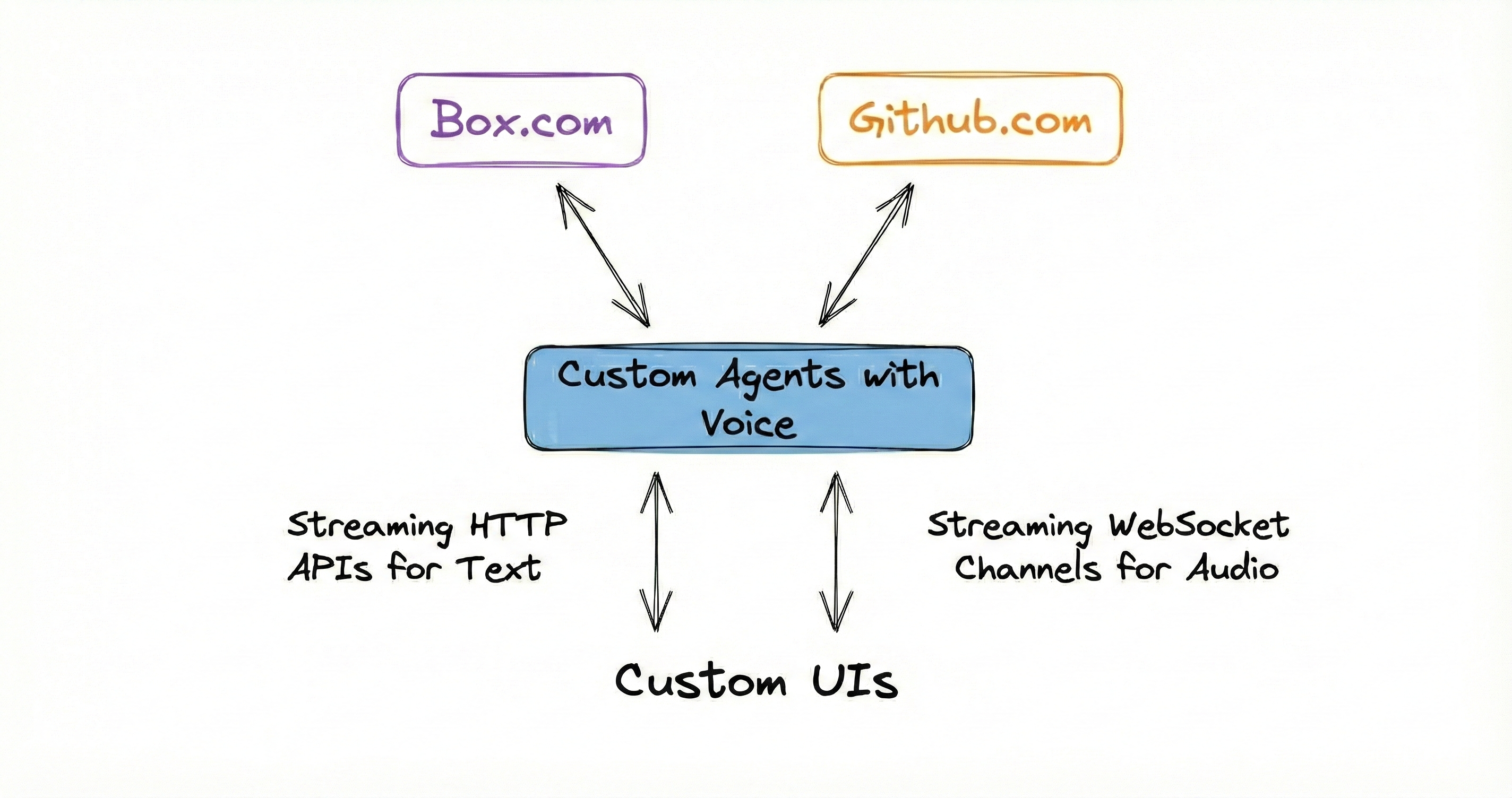 The complete source code is available at [github.com/build-trust/autonomy-and-box](https://github.com/build-trust/autonomy-and-box).
***
## Prerequisites
Before starting, ensure you have:
1. [Sign up and install the `autonomy` command.](/get-started)
2. A Box developer account with API credentials.
3. A GitHub personal access token.
4. Docker running on your machine.
***
## Project Structure
```text File Structure: theme={null}
autonomy-and-box/
|-- autonomy.yaml # Deployment configuration
|-- secrets.yaml # Your API credentials (gitignored)
|-- secrets.yaml.example # Template for credentials
|-- images/
| |-- main/
| |-- Dockerfile # Container definition
| |-- main.py # Application entry point
| |-- box.py # Box API client
| |-- github.py # GitHub issue creation tool
| |-- index.html # Voice interface
| |-- requirements.txt
|
|-- scripts/
|-- upload_docs_to_box.py # Utility to populate Box
```
***
## Step 1: Clone the Repository
```bash theme={null}
git clone https://github.com/build-trust/autonomy-and-box.git
cd autonomy-and-box
```
***
## Step 2: Configure Box Credentials
Create a Box application in the [Box Developer Console](https://app.box.com/developers/console):
1. Create a new **Custom App**.
2. Select **Server Authentication (Client Credentials Grant)**.
3. Under **Configuration**, note your:
* Client ID.
* Client Secret.
* Enterprise ID.
Copy the secrets template and add your credentials:
```bash theme={null}
cp secrets.yaml.example secrets.yaml
```
Edit `secrets.yaml`:
```yaml secrets.yaml theme={null}
BOX_CLIENT_ID: "your_box_client_id"
BOX_CLIENT_SECRET: "your_box_client_secret"
BOX_ENTERPRISE_ID: "your_box_enterprise_id"
GITHUB_TOKEN: "your_github_token"
GITHUB_REPO: "your-org/your-repo"
```
Never commit `secrets.yaml` to version control. It's already in `.gitignore`.
***
## Step 3: Configure GitHub Access
Create a [GitHub Personal Access Token](https://github.com/settings/tokens) with `repo` scope to allow issue creation.
Add the token and target repository to your `secrets.yaml`:
```yaml theme={null}
GITHUB_TOKEN: "ghp_xxxxxxxxxxxxxxxxxxxx"
GITHUB_REPO: "your-org/your-repo"
```
***
## Step 4: Upload Documents to Box
The application searches documents stored in a Box folder. Use the included script to populate Box with sample documentation:
```bash theme={null}
cd scripts
pip install box-sdk-gen httpx
python upload_docs_to_box.py
```
This script:
1. Fetches documentation from `autonomy.computer/docs/llms.txt`.
2. Parses all markdown file URLs.
3. Creates a `docs` folder in Box.
4. Uploads all documentation files.
***
## Step 5: Understand the Application Code
### The Main Application
The application creates a voice-enabled agent with access to a knowledge base and GitHub tools:
```python images/main/main.py theme={null}
from autonomy import (
Node,
Agent,
Model,
Knowledge,
KnowledgeTool,
NaiveChunker,
HttpServer,
Tool,
)
async def main(node: Node):
# Create knowledge base for document search
knowledge = Knowledge(
name="autonomy_docs",
searchable=True,
model=Model("embed-english-v3"),
max_results=5,
max_distance=0.4,
chunker=NaiveChunker(max_characters=1024, overlap=128),
)
# Create tools
knowledge_tool = KnowledgeTool(knowledge=knowledge, name="search_autonomy_docs")
github_tool = Tool(create_github_issue)
# Start the voice-enabled agent
await Agent.start(
node=node,
name="autonomy-docs",
instructions=INSTRUCTIONS,
model=Model("claude-sonnet-4-v1", max_tokens=256),
tools=[knowledge_tool, github_tool],
voice={
"voice": "alloy",
"instructions": VOICE_INSTRUCTIONS,
"vad_threshold": 0.7,
"vad_silence_duration_ms": 700,
},
)
# Load documents from Box
await load_documents_from_box(knowledge)
```
### Box Integration
The Box client handles authentication and document retrieval:
```python images/main/box.py theme={null}
from box_sdk_gen import BoxClient, BoxCCGAuth, CCGConfig
class Box:
def __init__(self):
self.client = BoxClient(
auth=BoxCCGAuth(
config=CCGConfig(
client_id=environ["BOX_CLIENT_ID"],
client_secret=environ["BOX_CLIENT_SECRET"],
enterprise_id=environ["BOX_ENTERPRISE_ID"],
)
)
)
async def extract_text_representation(self, file_id: str) -> str:
"""Download file content from Box."""
return await self.box_call(box_file_download_content, self.client, file_id)
async def list_folder_items(self, folder_id: str):
"""List items in a Box folder."""
return await self.box_call(self.client.folders.get_folder_items, folder_id)
```
### GitHub Issue Tool
The GitHub tool allows the agent to create issues based on user requests:
```python images/main/github.py theme={null}
async def create_github_issue(title: str, body: str, labels: str = "") -> str:
"""
Create a GitHub issue in the configured repository.
Args:
title: The title of the issue
body: The detailed description of the issue
labels: Comma-separated list of labels to apply (optional)
Returns:
A message indicating success or failure with the issue URL
"""
url = f"https://api.github.com/repos/{GITHUB_REPO}/issues"
async with httpx.AsyncClient() as client:
response = await client.post(url, headers=headers, json=data)
if response.status_code == 201:
issue_data = response.json()
return f"Successfully created issue #{issue_data['number']}: {issue_data['html_url']}"
```
### Agent Instructions
The agent has two sets of instructions - one for the primary agent and one for the voice interface:
```python theme={null}
INSTRUCTIONS = """
You are an expert assistant that answers questions about Autonomy.
You have access to a knowledge base containing complete documentation.
Use the search_autonomy_docs tool to find accurate information before answering.
IMPORTANT: Keep your responses concise - ideally 2-4 sentences. This assistant
is primarily used through a voice interface, so brevity is essential.
You also have the ability to create GitHub issues when users want to:
- Report bugs or problems.
- Request new features.
- Ask for documentation improvements.
"""
VOICE_INSTRUCTIONS = """
You are a voice interface for an Autonomy documentation assistant.
# Personality
- Friendly and approachable, like a helpful colleague
- Concise and clear - respect the user's time
- Confident but not condescending
# Critical Rules
1. Before answering ANY question, say a filler phrase first.
Pick one randomly: "Good question." / "Right, so." / "That's a good question."
2. THEN delegate to the primary agent for the actual answer.
3. NEVER answer questions from your own knowledge - always delegate.
"""
```
***
## Step 6: Deploy the Application
Deploy to Autonomy Computer:
```bash theme={null}
autonomy zone deploy
```
The deployment configuration in `autonomy.yaml` defines the infrastructure:
```yaml autonomy.yaml theme={null}
name: boxdocs
pods:
- name: main-pod
public: true
size: big
containers:
- name: main
image: main
env:
- BOX_CLIENT_ID: secrets.BOX_CLIENT_ID
- BOX_CLIENT_SECRET: secrets.BOX_CLIENT_SECRET
- BOX_ENTERPRISE_ID: secrets.BOX_ENTERPRISE_ID
- BOX_FOLDER_PATH: "docs"
- GITHUB_TOKEN: secrets.GITHUB_TOKEN
- GITHUB_REPO: secrets.GITHUB_REPO
```
The `size: big` setting allocates more resources for the embedding model and voice processing.
***
## Step 7: Access the Voice Interface
Once deployed, open your zone URL in a browser:
```
https://${CLUSTER}-boxdocs.cluster.autonomy.computer
```
To find your cluster name:
```bash theme={null}
autonomy cluster show
```
Click the voice button and start talking to your assistant!
***
## Using the Application
### Voice Commands
Try these voice interactions:
* **"What is Autonomy?"** - Searches the knowledge base and responds.
* **"How do I create an agent?"** - Retrieves relevant documentation.
* **"I found a bug, help me report it"** - Creates a GitHub issue.
* **"Can you file a feature request for better logging?"** - Creates a GitHub issue.
### API Access
You can also interact via HTTP:
```bash theme={null}
curl --request POST \
--header "Content-Type: application/json" \
--data '{"message":"What are tools in Autonomy?"}' \
"https://${CLUSTER}-boxdocs.cluster.autonomy.computer/agents/autonomy-docs?stream=true"
```
### Refresh Knowledge Base
The knowledge base automatically refreshes every hour. To manually refresh:
```bash theme={null}
curl --request POST \
"https://${CLUSTER}-boxdocs.cluster.autonomy.computer/refresh"
```
***
## How It Works
### Document Loading
When the application starts:
1. Connects to Box using CCG authentication.
2. Navigates to the configured folder path (`docs`).
3. Recursively lists all files in the folder.
4. Downloads each file's text content.
5. Chunks documents and generates embeddings.
6. Stores embeddings in the knowledge base.
### Voice Flow
When a user speaks:
1. Browser captures audio via Web Audio API.
2. Audio streams to the agent via WebSocket.
3. Voice Activity Detection (VAD) detects speech boundaries.
4. Speech is transcribed and sent to the voice agent.
5. Voice agent delegates to the primary agent.
6. Primary agent searches knowledge and/or creates issues.
7. Response is synthesized to speech.
8. Audio streams back to the browser.
### Knowledge Search
When searching documents:
1. Query is embedded using Cohere's embed-english-v3.
2. Vector similarity search finds relevant chunks.
3. Top 5 results within distance threshold (0.4) are returned.
4. Agent uses retrieved context to answer.
***
## Configuration Options
### Voice Settings
Customize voice behavior in `main.py`:
```python theme={null}
voice={
"voice": "alloy", # Voice model: alloy, echo, fable, onyx, nova, shimmer
"instructions": VOICE_INSTRUCTIONS,
"vad_threshold": 0.7, # Speech detection sensitivity (0.0-1.0)
"vad_silence_duration_ms": 700, # Silence before end of speech
}
```
### Knowledge Settings
Tune document search:
```python theme={null}
knowledge = Knowledge(
name="autonomy_docs",
searchable=True,
model=Model("embed-english-v3"),
max_results=5, # Number of results to return
max_distance=0.4, # Similarity threshold (lower = stricter)
chunker=NaiveChunker(
max_characters=1024, # Chunk size
overlap=128 # Overlap between chunks
),
)
```
### Environment Variables
| Variable | Description |
| ------------------- | -------------------------------- |
| `BOX_CLIENT_ID` | Box OAuth client ID |
| `BOX_CLIENT_SECRET` | Box OAuth client secret |
| `BOX_ENTERPRISE_ID` | Box enterprise ID |
| `BOX_FOLDER_PATH` | Path to documents folder in Box |
| `MAX_DOCUMENTS` | Limit documents loaded (0 = all) |
| `GITHUB_TOKEN` | GitHub personal access token |
| `GITHUB_REPO` | Target repository (owner/repo) |
***
## Build with a coding agent
See the guide on building Autonomy apps [using coding agents](/build-with-a-coding-agent).
***
## Troubleshooting
Verify your credentials in `secrets.yaml`. Ensure your Box app uses **Server Authentication (Client Credentials Grant)** and has the necessary scopes enabled.
Check that `BOX_FOLDER_PATH` matches your Box folder name. View logs with `autonomy zone inlet --to logs` to see which folders are found.
Verify your GitHub token has `repo` scope and the repository format is `owner/repo`.
Ensure your browser has microphone permissions. Use Chrome or Edge for best WebSocket and Web Audio API support.
***
## Learn More
Give agents the ability to listen and speak.
Give agents the ability to search a corpus of documents.
Give agents the ability to take actions.
How to organize an application built with the Autonomy Framework.
The complete source code is available at [github.com/build-trust/autonomy-and-box](https://github.com/build-trust/autonomy-and-box).
***
## Prerequisites
Before starting, ensure you have:
1. [Sign up and install the `autonomy` command.](/get-started)
2. A Box developer account with API credentials.
3. A GitHub personal access token.
4. Docker running on your machine.
***
## Project Structure
```text File Structure: theme={null}
autonomy-and-box/
|-- autonomy.yaml # Deployment configuration
|-- secrets.yaml # Your API credentials (gitignored)
|-- secrets.yaml.example # Template for credentials
|-- images/
| |-- main/
| |-- Dockerfile # Container definition
| |-- main.py # Application entry point
| |-- box.py # Box API client
| |-- github.py # GitHub issue creation tool
| |-- index.html # Voice interface
| |-- requirements.txt
|
|-- scripts/
|-- upload_docs_to_box.py # Utility to populate Box
```
***
## Step 1: Clone the Repository
```bash theme={null}
git clone https://github.com/build-trust/autonomy-and-box.git
cd autonomy-and-box
```
***
## Step 2: Configure Box Credentials
Create a Box application in the [Box Developer Console](https://app.box.com/developers/console):
1. Create a new **Custom App**.
2. Select **Server Authentication (Client Credentials Grant)**.
3. Under **Configuration**, note your:
* Client ID.
* Client Secret.
* Enterprise ID.
Copy the secrets template and add your credentials:
```bash theme={null}
cp secrets.yaml.example secrets.yaml
```
Edit `secrets.yaml`:
```yaml secrets.yaml theme={null}
BOX_CLIENT_ID: "your_box_client_id"
BOX_CLIENT_SECRET: "your_box_client_secret"
BOX_ENTERPRISE_ID: "your_box_enterprise_id"
GITHUB_TOKEN: "your_github_token"
GITHUB_REPO: "your-org/your-repo"
```
Never commit `secrets.yaml` to version control. It's already in `.gitignore`.
***
## Step 3: Configure GitHub Access
Create a [GitHub Personal Access Token](https://github.com/settings/tokens) with `repo` scope to allow issue creation.
Add the token and target repository to your `secrets.yaml`:
```yaml theme={null}
GITHUB_TOKEN: "ghp_xxxxxxxxxxxxxxxxxxxx"
GITHUB_REPO: "your-org/your-repo"
```
***
## Step 4: Upload Documents to Box
The application searches documents stored in a Box folder. Use the included script to populate Box with sample documentation:
```bash theme={null}
cd scripts
pip install box-sdk-gen httpx
python upload_docs_to_box.py
```
This script:
1. Fetches documentation from `autonomy.computer/docs/llms.txt`.
2. Parses all markdown file URLs.
3. Creates a `docs` folder in Box.
4. Uploads all documentation files.
***
## Step 5: Understand the Application Code
### The Main Application
The application creates a voice-enabled agent with access to a knowledge base and GitHub tools:
```python images/main/main.py theme={null}
from autonomy import (
Node,
Agent,
Model,
Knowledge,
KnowledgeTool,
NaiveChunker,
HttpServer,
Tool,
)
async def main(node: Node):
# Create knowledge base for document search
knowledge = Knowledge(
name="autonomy_docs",
searchable=True,
model=Model("embed-english-v3"),
max_results=5,
max_distance=0.4,
chunker=NaiveChunker(max_characters=1024, overlap=128),
)
# Create tools
knowledge_tool = KnowledgeTool(knowledge=knowledge, name="search_autonomy_docs")
github_tool = Tool(create_github_issue)
# Start the voice-enabled agent
await Agent.start(
node=node,
name="autonomy-docs",
instructions=INSTRUCTIONS,
model=Model("claude-sonnet-4-v1", max_tokens=256),
tools=[knowledge_tool, github_tool],
voice={
"voice": "alloy",
"instructions": VOICE_INSTRUCTIONS,
"vad_threshold": 0.7,
"vad_silence_duration_ms": 700,
},
)
# Load documents from Box
await load_documents_from_box(knowledge)
```
### Box Integration
The Box client handles authentication and document retrieval:
```python images/main/box.py theme={null}
from box_sdk_gen import BoxClient, BoxCCGAuth, CCGConfig
class Box:
def __init__(self):
self.client = BoxClient(
auth=BoxCCGAuth(
config=CCGConfig(
client_id=environ["BOX_CLIENT_ID"],
client_secret=environ["BOX_CLIENT_SECRET"],
enterprise_id=environ["BOX_ENTERPRISE_ID"],
)
)
)
async def extract_text_representation(self, file_id: str) -> str:
"""Download file content from Box."""
return await self.box_call(box_file_download_content, self.client, file_id)
async def list_folder_items(self, folder_id: str):
"""List items in a Box folder."""
return await self.box_call(self.client.folders.get_folder_items, folder_id)
```
### GitHub Issue Tool
The GitHub tool allows the agent to create issues based on user requests:
```python images/main/github.py theme={null}
async def create_github_issue(title: str, body: str, labels: str = "") -> str:
"""
Create a GitHub issue in the configured repository.
Args:
title: The title of the issue
body: The detailed description of the issue
labels: Comma-separated list of labels to apply (optional)
Returns:
A message indicating success or failure with the issue URL
"""
url = f"https://api.github.com/repos/{GITHUB_REPO}/issues"
async with httpx.AsyncClient() as client:
response = await client.post(url, headers=headers, json=data)
if response.status_code == 201:
issue_data = response.json()
return f"Successfully created issue #{issue_data['number']}: {issue_data['html_url']}"
```
### Agent Instructions
The agent has two sets of instructions - one for the primary agent and one for the voice interface:
```python theme={null}
INSTRUCTIONS = """
You are an expert assistant that answers questions about Autonomy.
You have access to a knowledge base containing complete documentation.
Use the search_autonomy_docs tool to find accurate information before answering.
IMPORTANT: Keep your responses concise - ideally 2-4 sentences. This assistant
is primarily used through a voice interface, so brevity is essential.
You also have the ability to create GitHub issues when users want to:
- Report bugs or problems.
- Request new features.
- Ask for documentation improvements.
"""
VOICE_INSTRUCTIONS = """
You are a voice interface for an Autonomy documentation assistant.
# Personality
- Friendly and approachable, like a helpful colleague
- Concise and clear - respect the user's time
- Confident but not condescending
# Critical Rules
1. Before answering ANY question, say a filler phrase first.
Pick one randomly: "Good question." / "Right, so." / "That's a good question."
2. THEN delegate to the primary agent for the actual answer.
3. NEVER answer questions from your own knowledge - always delegate.
"""
```
***
## Step 6: Deploy the Application
Deploy to Autonomy Computer:
```bash theme={null}
autonomy zone deploy
```
The deployment configuration in `autonomy.yaml` defines the infrastructure:
```yaml autonomy.yaml theme={null}
name: boxdocs
pods:
- name: main-pod
public: true
size: big
containers:
- name: main
image: main
env:
- BOX_CLIENT_ID: secrets.BOX_CLIENT_ID
- BOX_CLIENT_SECRET: secrets.BOX_CLIENT_SECRET
- BOX_ENTERPRISE_ID: secrets.BOX_ENTERPRISE_ID
- BOX_FOLDER_PATH: "docs"
- GITHUB_TOKEN: secrets.GITHUB_TOKEN
- GITHUB_REPO: secrets.GITHUB_REPO
```
The `size: big` setting allocates more resources for the embedding model and voice processing.
***
## Step 7: Access the Voice Interface
Once deployed, open your zone URL in a browser:
```
https://${CLUSTER}-boxdocs.cluster.autonomy.computer
```
To find your cluster name:
```bash theme={null}
autonomy cluster show
```
Click the voice button and start talking to your assistant!
***
## Using the Application
### Voice Commands
Try these voice interactions:
* **"What is Autonomy?"** - Searches the knowledge base and responds.
* **"How do I create an agent?"** - Retrieves relevant documentation.
* **"I found a bug, help me report it"** - Creates a GitHub issue.
* **"Can you file a feature request for better logging?"** - Creates a GitHub issue.
### API Access
You can also interact via HTTP:
```bash theme={null}
curl --request POST \
--header "Content-Type: application/json" \
--data '{"message":"What are tools in Autonomy?"}' \
"https://${CLUSTER}-boxdocs.cluster.autonomy.computer/agents/autonomy-docs?stream=true"
```
### Refresh Knowledge Base
The knowledge base automatically refreshes every hour. To manually refresh:
```bash theme={null}
curl --request POST \
"https://${CLUSTER}-boxdocs.cluster.autonomy.computer/refresh"
```
***
## How It Works
### Document Loading
When the application starts:
1. Connects to Box using CCG authentication.
2. Navigates to the configured folder path (`docs`).
3. Recursively lists all files in the folder.
4. Downloads each file's text content.
5. Chunks documents and generates embeddings.
6. Stores embeddings in the knowledge base.
### Voice Flow
When a user speaks:
1. Browser captures audio via Web Audio API.
2. Audio streams to the agent via WebSocket.
3. Voice Activity Detection (VAD) detects speech boundaries.
4. Speech is transcribed and sent to the voice agent.
5. Voice agent delegates to the primary agent.
6. Primary agent searches knowledge and/or creates issues.
7. Response is synthesized to speech.
8. Audio streams back to the browser.
### Knowledge Search
When searching documents:
1. Query is embedded using Cohere's embed-english-v3.
2. Vector similarity search finds relevant chunks.
3. Top 5 results within distance threshold (0.4) are returned.
4. Agent uses retrieved context to answer.
***
## Configuration Options
### Voice Settings
Customize voice behavior in `main.py`:
```python theme={null}
voice={
"voice": "alloy", # Voice model: alloy, echo, fable, onyx, nova, shimmer
"instructions": VOICE_INSTRUCTIONS,
"vad_threshold": 0.7, # Speech detection sensitivity (0.0-1.0)
"vad_silence_duration_ms": 700, # Silence before end of speech
}
```
### Knowledge Settings
Tune document search:
```python theme={null}
knowledge = Knowledge(
name="autonomy_docs",
searchable=True,
model=Model("embed-english-v3"),
max_results=5, # Number of results to return
max_distance=0.4, # Similarity threshold (lower = stricter)
chunker=NaiveChunker(
max_characters=1024, # Chunk size
overlap=128 # Overlap between chunks
),
)
```
### Environment Variables
| Variable | Description |
| ------------------- | -------------------------------- |
| `BOX_CLIENT_ID` | Box OAuth client ID |
| `BOX_CLIENT_SECRET` | Box OAuth client secret |
| `BOX_ENTERPRISE_ID` | Box enterprise ID |
| `BOX_FOLDER_PATH` | Path to documents folder in Box |
| `MAX_DOCUMENTS` | Limit documents loaded (0 = all) |
| `GITHUB_TOKEN` | GitHub personal access token |
| `GITHUB_REPO` | Target repository (owner/repo) |
***
## Build with a coding agent
See the guide on building Autonomy apps [using coding agents](/build-with-a-coding-agent).
***
## Troubleshooting
Verify your credentials in `secrets.yaml`. Ensure your Box app uses **Server Authentication (Client Credentials Grant)** and has the necessary scopes enabled.
Check that `BOX_FOLDER_PATH` matches your Box folder name. View logs with `autonomy zone inlet --to logs` to see which folders are found.
Verify your GitHub token has `repo` scope and the repository format is `owner/repo`.
Ensure your browser has microphone permissions. Use Chrome or Edge for best WebSocket and Web Audio API support.
***
## Learn More
Give agents the ability to listen and speak.
Give agents the ability to search a corpus of documents.
Give agents the ability to take actions.
How to organize an application built with the Autonomy Framework.