> ## Documentation Index
> Fetch the complete documentation index at: https://autonomy.computer/docs/llms.txt
> Use this file to discover all available pages before exploring further.
# Research new signups
> Build an agentic app that uses Linkup search APIs as tools to research new user signups and provide personalized outreach recommendations.
When a new user signs up for your product, understanding their background and company helps you
personalize outreach and identify how your product can help them. Manually researching each
signup does not scale. An AI agent with [Linkup](https://linkup.so) search APIs as tools can do this automatically.
This guide shows you how to build a signup research application that:
* Accepts a person's name, email, and organization
* Searches the web to gather company and person information
* Generates a detailed research report with personalized recommendations
* Streams results in real-time through a modern web UI
```text theme={null}
+----------------+ +----------------+ +----------------+
| User enters |------>| Next.js UI |------>| FastAPI |
| signup info | | (Browser) | | /api/research |
+----------------+ +----------------+ +-------+--------+
|
+-----------------------------------------------+
|
v
+----------------+ +----------------+ +----------------+
| Research |------>| Linkup Search |------>| Research |
| Agent | | API Tools | | Report |
+----------------+ +----------------+ +----------------+
```
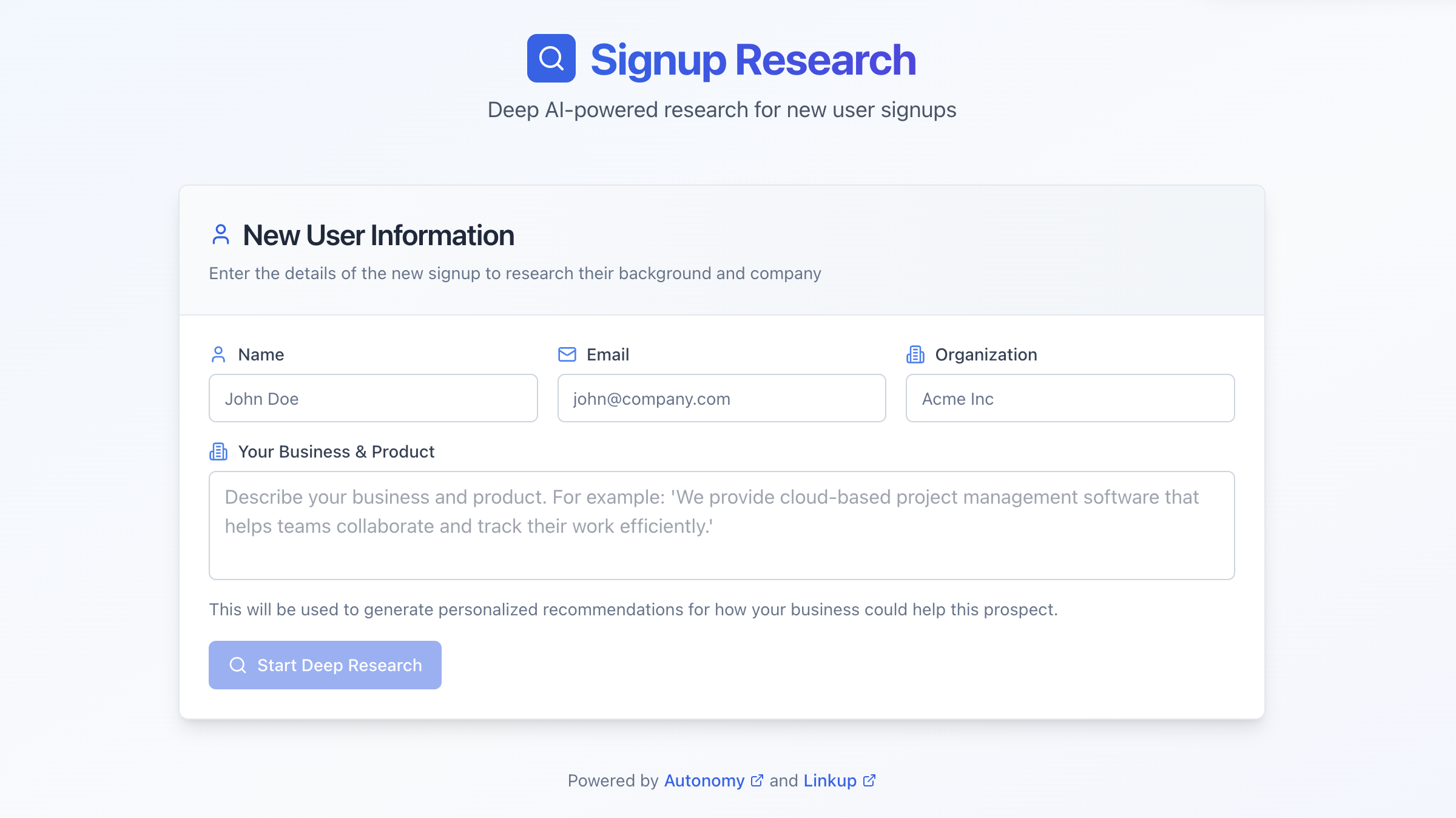 The complete source code is available in [Autonomy examples](https://github.com/build-trust/autonomy/tree/main/examples/deep-research/signup-research).
***
## Quick start
Complete the [steps to get started](/get-started) with Autonomy.
Sign up at [Linkup](https://app.linkup.so) and get your API key. Linkup provides a web search API that the agent uses to gather information.
See the [Linkup Python SDK documentation](https://docs.linkup.so/pages/sdk/python/python) for more details.
```bash /dev/null/terminal.sh theme={null}
curl -sL https://github.com/build-trust/autonomy/archive/refs/heads/main.tar.gz | \
tar -xz --strip-components=3 autonomy-main/examples/deep-research/signup-research
cd signup-research
```
This creates the following structure:
```text File Structure: theme={null}
signup-research/
|-- autonomy.yaml
|-- secrets.yaml.example
|-- images/
|-- main/
|-- Dockerfile
|-- requirements.txt
|-- main.py # Agent and FastAPI server
|-- public/ # Compiled Next.js UI
|-- ui/ # Next.js source (optional)
|-- src/
|-- app/
|-- page.tsx # Main UI component
```
Create a `secrets.yaml` file with your Linkup API key:
```yaml secrets.yaml theme={null}
LINKUP_API_KEY: "your_linkup_api_key_here"
```
```bash /dev/null/terminal.sh theme={null}
autonomy
```
Once deployed, open your zone URL in a browser to access the research interface.
***
## Build with a coding agent
You can also build this application from scratch using a coding agent like Claude Code, Cursor, or Codex CLI.
Complete the [steps to get started](/get-started) with Autonomy.
Sign up at [Linkup](https://app.linkup.so) and get your API key.
```text Prompt: theme={null}
Use curl to fetch the raw markdown from this doc and all its linked pages on creating a new Autonomy application:
https://autonomy.computer/docs/_for-coding-agents.md
Read all documentation thoroughly before writing any code.
Use the above documentation to create a new Autonomy app for researching new user signups.
The workflow is:
- The user enters a person's name, email, and organization into a form.
- The user also enters a description of their own business/product.
- An agent researches the person and company using web search.
- The agent generates a report with company profile, person profile, and recommendations.
- Recommendations explain how the user's business could help the researched person.
Use the Linkup Python SDK for web search. See: https://docs.linkup.so/pages/sdk/python/python
Create two tools: linkup_search for web search and linkup_fetch for fetching page content.
Create a Next.js UI with shadcn/ui that:
- Has input fields for name, email, organization
- Has a textarea for business description
- Shows streaming results as the agent researches
- Displays the final report with markdown formatting
Deploy and test the app in Autonomy.
Unset NO_COLOR in your shell before running any autonomy command.
```
Your coding agent will create the complete application including the research agent, web search tools, FastAPI endpoints, and Next.js interface.
***
## How it works
The application uses a research agent powered by Claude with access to web search tools via the Linkup API.
The agent has two tools to gather information using the Linkup API:
```python images/main/main.py theme={null}
def linkup_search(
query: str,
output_type: str = "sourcedAnswer",
max_results: int = 5
) -> str:
"""
Search the web using Linkup API for fresh, trusted information.
Args:
query: The search query string.
output_type: "sourcedAnswer" for natural language answer with citations.
max_results: Maximum number of results (default 5).
Returns:
JSON string with search results or sourced answer with citations.
"""
response = linkup_client.search(
query=query,
depth="standard",
output_type=output_type,
max_results=max_results,
)
# Process and return results...
```
```python images/main/main.py theme={null}
def linkup_fetch(url: str) -> str:
"""
Fetch and extract content from a web page URL using Linkup API.
Use this to get detailed content from specific pages.
Args:
url: The fully qualified URL to fetch.
Returns:
JSON string with the extracted markdown content from the page.
"""
response = linkup_client.fetch(url=url)
# Process and return content...
```
The agent receives instructions that include the user's business description, allowing it to generate personalized recommendations:
```python images/main/main.py theme={null}
AGENT_INSTRUCTIONS_TEMPLATE = """You are a research analyst who helps sales teams understand new signups.
## YOUR CLIENT'S BUSINESS
You are researching on behalf of a business with the following description:
{business_description}
## RESEARCH PROCESS
1. Search for company info (1-2 searches)
2. Search for the person's role and LinkedIn (1-2 searches)
3. Write the final report DIRECTLY as your response
## REPORT FORMAT
# Research Report: [Person Name] at [Company]
## Executive Summary
2-3 sentence overview of who this person is and what their company does.
## Company Profile
- **Company**: Name and website
- **Industry**: What they do
- **Products/Services**: Key offerings
- **Size/Funding**: If known
## Person Profile
- **Name**: Full name
- **Role**: Current position
- **Background**: Professional experience
- **LinkedIn**: URL if found
## Recommendations for Outreach
- How the client's business (described above) could help them
- Specific use cases based on their industry
- Personalization hooks from research
## Sources
- List URLs consulted
"""
```
The FastAPI endpoint creates a fresh agent for each research request and streams the response:
```python images/main/main.py theme={null}
@app.post("/api/research")
async def research(request: ResearchRequest, node: NodeDep):
agent_name = f"researcher_{secrets.token_hex(4)}"
instructions = AGENT_INSTRUCTIONS_TEMPLATE.format(
business_description=request.business_description
)
agent = await Agent.start(
node=node,
name=agent_name,
instructions=instructions,
model=Model("claude-sonnet-4-5"),
tools=[
Tool(linkup_search),
Tool(linkup_fetch),
FilesystemTools(visibility="conversation"),
],
)
message = f"""Research this new signup and write a report:
- **Name**: {request.name}
- **Email**: {request.email}
- **Organization**: {request.organization}
"""
async def stream_response():
async for response in agent.send_stream(message, timeout=300):
yield json.dumps(response.snippet, default=json_serializer) + "\n"
return StreamingResponse(stream_response(), media_type="application/json")
```
***
## Customize the agent
Edit the agent instructions in `images/main/main.py` to focus on different aspects:
```python images/main/main.py theme={null}
AGENT_INSTRUCTIONS_TEMPLATE = """You are a research analyst focused on technical evaluation.
## RESEARCH PROCESS
1. Search for the company's tech stack and engineering blog
2. Search for the person's technical background and GitHub
3. Identify technical challenges they might face
## REPORT FORMAT
Focus on:
- Technical infrastructure and tools they use
- Engineering team size and structure
- Open source contributions
- Technical pain points your product solves
"""
```
Give the agent additional capabilities by adding more tools:
```python images/main/main.py theme={null}
def check_company_funding(company_name: str) -> str:
"""Check recent funding rounds for a company."""
# Implement using Crunchbase API or similar
pass
agent = await Agent.start(
node=node,
name=agent_name,
instructions=instructions,
model=Model("claude-sonnet-4-5"),
tools=[
Tool(linkup_search),
Tool(linkup_fetch),
Tool(check_company_funding), # Add new tool
],
)
```
Change the model for different performance characteristics:
```python images/main/main.py theme={null}
# For faster responses
model=Model("claude-haiku-3-5")
# For more capable research
model=Model("claude-sonnet-4-5")
```
***
## API reference
Research a new signup and stream the results via `POST /api/research`.
**Request:**
```json /dev/null/request.json theme={null}
{
"name": "Jane Doe",
"email": "jane@example.com",
"organization": "Example Corp",
"business_description": "We provide cloud-based project management software."
}
```
**Response (streaming):**
```json /dev/null/response.json theme={null}
{"messages": [...], "type": "conversation_snippet"}
```
***
## Integrate into your product
The `/api/research` endpoint is a standard HTTP API that you can call from anywhere, not just the included web UI. This makes it easy to integrate signup research into your existing workflows and products.
Trigger research automatically when a new user signs up:
```python /dev/null/example.py theme={null}
import requests
def on_user_signup(user):
response = requests.post(
"https://your-zone.cluster.autonomy.computer/api/research",
json={
"name": user.name,
"email": user.email,
"organization": user.company,
"business_description": "We provide cloud-based analytics software."
},
stream=True
)
# Collect the streamed response
report = ""
for line in response.iter_lines():
if line:
data = json.loads(line)
for msg in data.get("messages", []):
if msg.get("content", {}).get("text"):
report += msg["content"]["text"]
# Save to your CRM, send to Slack, etc.
save_research_report(user.id, report)
```
Call the API from Zapier, Make, n8n, or any workflow automation tool that supports HTTP requests. Add a research button to your admin dashboard that fetches insights about any user on demand, or automatically enrich user profiles in the background when they sign up.
***
**Learn more**
Available models for agents.
Build agents with custom instructions and tools.
Give agents the ability to take actions.
Create APIs for Autonomy applications.
**Troubleshoot**
* Verify your API key at [app.linkup.so](https://app.linkup.so).
* Check that `secrets.yaml` is in the correct format.
* Ensure the key is passed as `LINKUP_API_KEY` environment variable.
* The agent typically completes in 30-60 seconds.
* Check your zone logs for timeout errors.
* Consider reducing the number of searches in the agent instructions.
* Try more specific organization names.
* The person may have limited online presence.
* Check if the company website is accessible.
* Verify the UI is built and deployed: `cd ui && npm run build-autonomy`.
* Check browser console for JavaScript errors.
* Ensure the API endpoint returns proper streaming JSON.
The complete source code is available in [Autonomy examples](https://github.com/build-trust/autonomy/tree/main/examples/deep-research/signup-research).
***
## Quick start
Complete the [steps to get started](/get-started) with Autonomy.
Sign up at [Linkup](https://app.linkup.so) and get your API key. Linkup provides a web search API that the agent uses to gather information.
See the [Linkup Python SDK documentation](https://docs.linkup.so/pages/sdk/python/python) for more details.
```bash /dev/null/terminal.sh theme={null}
curl -sL https://github.com/build-trust/autonomy/archive/refs/heads/main.tar.gz | \
tar -xz --strip-components=3 autonomy-main/examples/deep-research/signup-research
cd signup-research
```
This creates the following structure:
```text File Structure: theme={null}
signup-research/
|-- autonomy.yaml
|-- secrets.yaml.example
|-- images/
|-- main/
|-- Dockerfile
|-- requirements.txt
|-- main.py # Agent and FastAPI server
|-- public/ # Compiled Next.js UI
|-- ui/ # Next.js source (optional)
|-- src/
|-- app/
|-- page.tsx # Main UI component
```
Create a `secrets.yaml` file with your Linkup API key:
```yaml secrets.yaml theme={null}
LINKUP_API_KEY: "your_linkup_api_key_here"
```
```bash /dev/null/terminal.sh theme={null}
autonomy
```
Once deployed, open your zone URL in a browser to access the research interface.
***
## Build with a coding agent
You can also build this application from scratch using a coding agent like Claude Code, Cursor, or Codex CLI.
Complete the [steps to get started](/get-started) with Autonomy.
Sign up at [Linkup](https://app.linkup.so) and get your API key.
```text Prompt: theme={null}
Use curl to fetch the raw markdown from this doc and all its linked pages on creating a new Autonomy application:
https://autonomy.computer/docs/_for-coding-agents.md
Read all documentation thoroughly before writing any code.
Use the above documentation to create a new Autonomy app for researching new user signups.
The workflow is:
- The user enters a person's name, email, and organization into a form.
- The user also enters a description of their own business/product.
- An agent researches the person and company using web search.
- The agent generates a report with company profile, person profile, and recommendations.
- Recommendations explain how the user's business could help the researched person.
Use the Linkup Python SDK for web search. See: https://docs.linkup.so/pages/sdk/python/python
Create two tools: linkup_search for web search and linkup_fetch for fetching page content.
Create a Next.js UI with shadcn/ui that:
- Has input fields for name, email, organization
- Has a textarea for business description
- Shows streaming results as the agent researches
- Displays the final report with markdown formatting
Deploy and test the app in Autonomy.
Unset NO_COLOR in your shell before running any autonomy command.
```
Your coding agent will create the complete application including the research agent, web search tools, FastAPI endpoints, and Next.js interface.
***
## How it works
The application uses a research agent powered by Claude with access to web search tools via the Linkup API.
The agent has two tools to gather information using the Linkup API:
```python images/main/main.py theme={null}
def linkup_search(
query: str,
output_type: str = "sourcedAnswer",
max_results: int = 5
) -> str:
"""
Search the web using Linkup API for fresh, trusted information.
Args:
query: The search query string.
output_type: "sourcedAnswer" for natural language answer with citations.
max_results: Maximum number of results (default 5).
Returns:
JSON string with search results or sourced answer with citations.
"""
response = linkup_client.search(
query=query,
depth="standard",
output_type=output_type,
max_results=max_results,
)
# Process and return results...
```
```python images/main/main.py theme={null}
def linkup_fetch(url: str) -> str:
"""
Fetch and extract content from a web page URL using Linkup API.
Use this to get detailed content from specific pages.
Args:
url: The fully qualified URL to fetch.
Returns:
JSON string with the extracted markdown content from the page.
"""
response = linkup_client.fetch(url=url)
# Process and return content...
```
The agent receives instructions that include the user's business description, allowing it to generate personalized recommendations:
```python images/main/main.py theme={null}
AGENT_INSTRUCTIONS_TEMPLATE = """You are a research analyst who helps sales teams understand new signups.
## YOUR CLIENT'S BUSINESS
You are researching on behalf of a business with the following description:
{business_description}
## RESEARCH PROCESS
1. Search for company info (1-2 searches)
2. Search for the person's role and LinkedIn (1-2 searches)
3. Write the final report DIRECTLY as your response
## REPORT FORMAT
# Research Report: [Person Name] at [Company]
## Executive Summary
2-3 sentence overview of who this person is and what their company does.
## Company Profile
- **Company**: Name and website
- **Industry**: What they do
- **Products/Services**: Key offerings
- **Size/Funding**: If known
## Person Profile
- **Name**: Full name
- **Role**: Current position
- **Background**: Professional experience
- **LinkedIn**: URL if found
## Recommendations for Outreach
- How the client's business (described above) could help them
- Specific use cases based on their industry
- Personalization hooks from research
## Sources
- List URLs consulted
"""
```
The FastAPI endpoint creates a fresh agent for each research request and streams the response:
```python images/main/main.py theme={null}
@app.post("/api/research")
async def research(request: ResearchRequest, node: NodeDep):
agent_name = f"researcher_{secrets.token_hex(4)}"
instructions = AGENT_INSTRUCTIONS_TEMPLATE.format(
business_description=request.business_description
)
agent = await Agent.start(
node=node,
name=agent_name,
instructions=instructions,
model=Model("claude-sonnet-4-5"),
tools=[
Tool(linkup_search),
Tool(linkup_fetch),
FilesystemTools(visibility="conversation"),
],
)
message = f"""Research this new signup and write a report:
- **Name**: {request.name}
- **Email**: {request.email}
- **Organization**: {request.organization}
"""
async def stream_response():
async for response in agent.send_stream(message, timeout=300):
yield json.dumps(response.snippet, default=json_serializer) + "\n"
return StreamingResponse(stream_response(), media_type="application/json")
```
***
## Customize the agent
Edit the agent instructions in `images/main/main.py` to focus on different aspects:
```python images/main/main.py theme={null}
AGENT_INSTRUCTIONS_TEMPLATE = """You are a research analyst focused on technical evaluation.
## RESEARCH PROCESS
1. Search for the company's tech stack and engineering blog
2. Search for the person's technical background and GitHub
3. Identify technical challenges they might face
## REPORT FORMAT
Focus on:
- Technical infrastructure and tools they use
- Engineering team size and structure
- Open source contributions
- Technical pain points your product solves
"""
```
Give the agent additional capabilities by adding more tools:
```python images/main/main.py theme={null}
def check_company_funding(company_name: str) -> str:
"""Check recent funding rounds for a company."""
# Implement using Crunchbase API or similar
pass
agent = await Agent.start(
node=node,
name=agent_name,
instructions=instructions,
model=Model("claude-sonnet-4-5"),
tools=[
Tool(linkup_search),
Tool(linkup_fetch),
Tool(check_company_funding), # Add new tool
],
)
```
Change the model for different performance characteristics:
```python images/main/main.py theme={null}
# For faster responses
model=Model("claude-haiku-3-5")
# For more capable research
model=Model("claude-sonnet-4-5")
```
***
## API reference
Research a new signup and stream the results via `POST /api/research`.
**Request:**
```json /dev/null/request.json theme={null}
{
"name": "Jane Doe",
"email": "jane@example.com",
"organization": "Example Corp",
"business_description": "We provide cloud-based project management software."
}
```
**Response (streaming):**
```json /dev/null/response.json theme={null}
{"messages": [...], "type": "conversation_snippet"}
```
***
## Integrate into your product
The `/api/research` endpoint is a standard HTTP API that you can call from anywhere, not just the included web UI. This makes it easy to integrate signup research into your existing workflows and products.
Trigger research automatically when a new user signs up:
```python /dev/null/example.py theme={null}
import requests
def on_user_signup(user):
response = requests.post(
"https://your-zone.cluster.autonomy.computer/api/research",
json={
"name": user.name,
"email": user.email,
"organization": user.company,
"business_description": "We provide cloud-based analytics software."
},
stream=True
)
# Collect the streamed response
report = ""
for line in response.iter_lines():
if line:
data = json.loads(line)
for msg in data.get("messages", []):
if msg.get("content", {}).get("text"):
report += msg["content"]["text"]
# Save to your CRM, send to Slack, etc.
save_research_report(user.id, report)
```
Call the API from Zapier, Make, n8n, or any workflow automation tool that supports HTTP requests. Add a research button to your admin dashboard that fetches insights about any user on demand, or automatically enrich user profiles in the background when they sign up.
***
**Learn more**
Available models for agents.
Build agents with custom instructions and tools.
Give agents the ability to take actions.
Create APIs for Autonomy applications.
**Troubleshoot**
* Verify your API key at [app.linkup.so](https://app.linkup.so).
* Check that `secrets.yaml` is in the correct format.
* Ensure the key is passed as `LINKUP_API_KEY` environment variable.
* The agent typically completes in 30-60 seconds.
* Check your zone logs for timeout errors.
* Consider reducing the number of searches in the agent instructions.
* Try more specific organization names.
* The person may have limited online presence.
* Check if the company website is accessible.
* Verify the UI is built and deployed: `cd ui && npm run build-autonomy`.
* Check browser console for JavaScript errors.
* Ensure the API endpoint returns proper streaming JSON.