

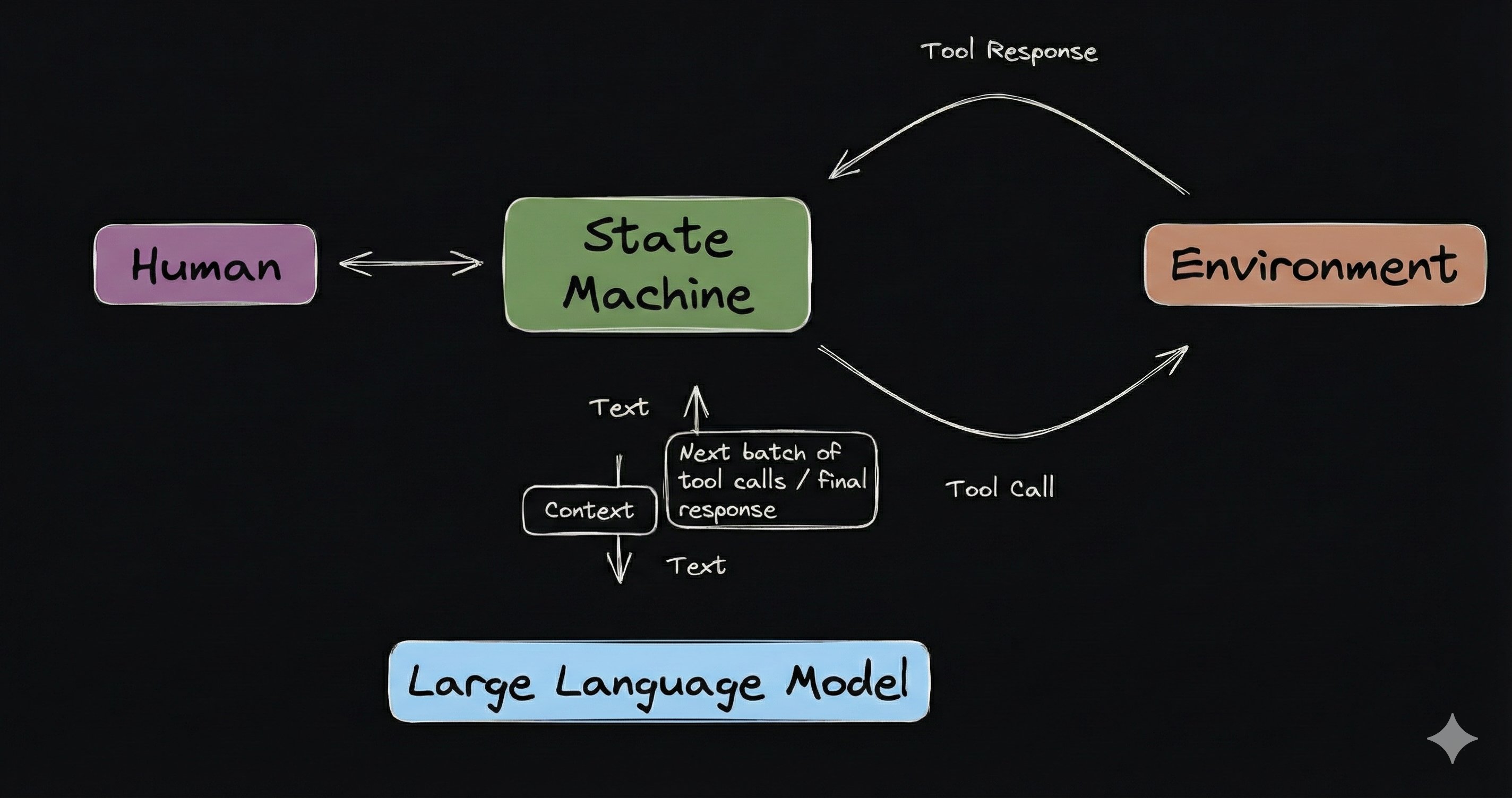
Context is the structured information than an agent gives its language
model at each conversational turn.
It includes system instructions, conversation history, and additional
information that helps the model decide the agent’s next step. Think of context
as everything a model “sees” when making a decision about the next step an
agent should take in its journey.
Agents use Context Templates to build context.
Context Summary (Recommended)
For long-running conversations, use the context_summary parameter in Agent.start()
to automatically manage context size. This is the simplest and recommended approach
for agents that need to sustain conversations with many messages.
Basic Usage
from autonomy import Agent, Model, Node
async def main(node):
# Enable summarization with defaults (floor=10, ceiling=20 messages)
await Agent.start(
node=node,
name="assistant",
instructions="You are a helpful assistant.",
model=Model("claude-sonnet-4-v1"),
context_summary=True, # That's it!
)
Node.start(main)
Custom Configuration
from autonomy import Agent, Model, Node
async def main(node):
await Agent.start(
node=node,
name="code-assistant",
instructions="You are a coding assistant.",
model=Model("claude-sonnet-4-v1"),
context_summary={
"floor": 15, # Keep at least 15 recent messages
"ceiling": 30, # Summarize when exceeding 30 messages
"size": 2048, # Limit summary to 2048 tokens
"model": Model("nova-micro-v1"), # Fast model for summaries
# Custom prompt template (must include {conversation} placeholder)
"instructions": """Summarize this coding conversation. Preserve:
- All code snippets verbatim
- Technical decisions and their rationale
- Error messages and solutions
Conversation:
{conversation}
Summary:""",
},
)
Node.start(main)
How It Works
- Messages accumulate normally until reaching
ceiling
- When
ceiling is exceeded, older messages are summarized in the background
- After summarization, model sees ~
floor messages (summary + recent)
- The verbatim window starts right after the summary (no hidden messages)
- The cycle repeats, keeping context bounded between
floor and ceiling
Configuration Options
| Option | Type | Default | Description |
|---|
floor | int | 10 | Minimum messages visible after summarization |
ceiling | int | 20 | Maximum messages before triggering summarization |
size | int | 2048 | Maximum tokens for the generated summary |
model | Model | agent’s model | Model used for generating summaries |
instructions | str | (default) | Custom prompt template (must include {conversation} placeholder) |
The async summarization approach provides significant performance improvements:
| Approach | Avg Latency | Stability |
|---|
| Sync Summarization | ~52s | High variance, timeouts |
| Memory Limits Only | ~27s | Moderate variance |
| context_summary | ~20s | Most stable |
context_summary cannot be used together with context_template.
Use context_summary for automatic summarization, or context_template
for full control over context structure.
Default Context Template
By default, agents use a context template with the following structure:
1. System instructions
The instructions that you provide Agent.start(..., instructions="", ...)
become a system message that appears first in the context.
2. Framework instructions
Agent’s provide a collection of built-in tools.
Instructions to use these tools are automatically injected after the
system instructions.
- Time tools - Get current time in UTC or local format
- Filesystem tools (if enabled) - Read, write, search files
- User input tool (if enabled) - Pause and ask the user for clarification
- Subagent tools (if configured) - Delegate work to specialized sub-agents
3. Conversation history
Messages from the current conversation, including:
- System messages.
- User messages.
- Model responses.
- Tool calls and their results.
The agent retrieves this from Memory to maintain conversational context.
You can provide an agent with specialized Tools using
Agent.start(..., tools=[], ...). Instructions to use these tools are injected
as the final piece of context.
Customize Context
You can customize how context is built by providing a custom Context Template
when starting an agent.
Custom Context Template
Provide a custom context template when starting an agent:
from autonomy import (
Agent, Model, Node,
ContextTemplate,
SystemInstructionsSection,
ConversationHistorySection,
FrameworkInstructionsSection,
)
def system_message(text):
return {"role": "system", "content": {"text": text, "type": "text"}, "phase": "system"}
async def main(node):
instructions = [system_message("You are a helpful assistant.")]
# Create custom template - sections don't need memory at construction
template = ContextTemplate([
SystemInstructionsSection(instructions),
FrameworkInstructionsSection(),
ConversationHistorySection(max_messages=50), # Limit to last 50 messages
])
await Agent.start(
node=node,
name="assistant",
instructions="You are a helpful assistant",
model=Model("claude-sonnet-4-v1"),
context_template=template, # Use custom template
)
Node.start(main)
Custom Sections
Create your own section by implementing the section interface. The get_messages
method receives memory as its first argument, giving you direct access to the
agent’s conversation history:
class CustomSection:
def __init__(self, data_source):
self.name = "custom_section"
self.enabled = True
self.data_source = data_source
async def get_messages(self, memory, scope, conversation, params):
# Memory is passed directly - use it to access conversation history
data = await self.data_source.get(scope, conversation)
if data:
return [{
"role": "system",
"content": {
"text": f"Additional context: {data}",
"type": "text"
}
}]
return []
Add Dynamic Context
Inject additional information into the context using AdditionalContextSection:
from autonomy import (
AdditionalContextSection, Agent, Model, Node,
ContextTemplate, SystemInstructionsSection,
ConversationHistorySection, FrameworkInstructionsSection,
)
# Cache for user preferences
preferences_cache = {}
async def provide_user_preferences(scope, conversation, params):
# Check cache first
if scope not in preferences_cache:
# Fetch from database only if not cached
preferences_cache[scope] = await database.fetch_user_preferences(scope)
# Example result: {"currency": "USD", "timezone": "America/New_York"}
p = preferences_cache[scope]
return [{
"role": "system",
"content": {
"text": f"User preferences: Currency={p['currency']}, Timezone={p['timezone']}",
"type": "text"
}
}]
def system_message(text):
return {"role": "system", "content": {"text": text, "type": "text"}, "phase": "system"}
async def main(node):
instructions = [system_message("You are a personalized shopping assistant")]
# Create template with user preferences section
template = ContextTemplate([
SystemInstructionsSection(instructions),
AdditionalContextSection(name="user_preferences", provider_fn=provide_user_preferences),
FrameworkInstructionsSection(),
ConversationHistorySection(),
])
await Agent.start(
node=node,
name="shopper",
instructions="You are a personalized shopping assistant",
model=Model("claude-sonnet-4-v1"),
context_template=template,
)
Node.start(main)
Filter Conversation History
Control which messages appear in context. Create a custom section that filters
messages - memory is passed directly to get_messages:
from autonomy import (
Agent, Model, Node,
ContextTemplate, SystemInstructionsSection, FrameworkInstructionsSection,
)
class FilteredHistorySection:
def __init__(self):
self.name = "conversation_history"
self.enabled = True
# Keep all non-tool messages, but only tool messages from last 10
async def get_messages(self, memory, scope, conversation, params):
# Memory is passed as first argument - no need to store it
messages = await memory.get_messages_only(scope, conversation)
last_10_start = max(0, len(messages) - 10)
return [msg for idx, msg in enumerate(messages)
if msg.get("role") != "tool" or idx >= last_10_start]
def system_message(text):
return {"role": "system", "content": {"text": text, "type": "text"}, "phase": "system"}
async def main(node):
instructions = [system_message("You are a helpful assistant")]
# Create template with filtered history section
template = ContextTemplate([
SystemInstructionsSection(instructions),
FrameworkInstructionsSection(),
FilteredHistorySection(),
])
await Agent.start(
node=node,
name="assistant",
instructions="You are a helpful assistant",
model=Model("claude-sonnet-4-v1"),
context_template=template,
)
Node.start(main)
Summarize Conversation History
For long-running conversations, you can use SummarizedHistorySection directly
in a custom context template. This gives you more control than the context_summary
parameter while still benefiting from async summarization.
For most use cases, prefer Agent.start(..., context_summary=True) which
automatically configures summarization. Use SummarizedHistorySection directly
only when you need a custom context template structure.
Using SummarizedHistorySection
The SummarizedHistorySection provides non-blocking summarization that
dramatically improves response times:
from autonomy import (
Agent, Model, Node, SummarizedHistorySection,
ContextTemplate, SystemInstructionsSection, FrameworkInstructionsSection,
)
def system_message(text):
return {"role": "system", "content": {"text": text, "type": "text"}, "phase": "system"}
async def main(node):
instructions = [system_message("You are a helpful assistant")]
# Create summarization section with new parameter names
async_history = SummarizedHistorySection(
summary_model=Model("nova-micro-v1"), # Use fast model for summaries
floor=10, # Min messages visible after summarization
ceiling=20, # Max messages before triggering summarization
size=2048, # Max tokens for summary
instructions="Preserve key decisions and action items.", # Optional
)
# Create template with async summarization
template = ContextTemplate([
SystemInstructionsSection(instructions),
FrameworkInstructionsSection(),
async_history,
])
await Agent.start(
node=node,
name="assistant",
instructions="You are a helpful assistant",
model=Model("claude-sonnet-4-v1"),
context_template=template,
)
Node.start(main)
How it works:
- When conversation exceeds
ceiling, summarization is triggered
- Summarization runs in the background - never blocks the response
- Returns cached summary immediately (even if slightly stale)
- The verbatim window starts right after the summary (no hidden messages)
- Re-summarizes when
batch_size (ceiling - floor) new messages accumulate
Configuration options:
| Parameter | Default | Description |
|---|
summary_model | required | Model for summaries (recommend fast model) |
floor | 10 | Min messages visible after summarization |
ceiling | 20 | Max messages before triggering summarization |
size | 2048 | Maximum tokens for generated summary |
instructions | None | Custom instructions for what to preserve |
Monitoring:
# Get summarization metrics
metrics = async_history.get_metrics()
# {'cache_hits': 15, 'cache_misses': 3, 'background_tasks_completed': 12, ...}
# Get cache information
info = async_history.get_cache_info()
# {'cached_conversations': 5, 'pending_summarizations': 1, ...}
# Clear cache for a specific conversation
async_history.clear_cache(scope="user123", conversation="conv456")
Custom Summarization
For more control, you can implement your own summarization section. Memory is
passed directly to get_messages:
from autonomy import (
Agent, Model, Node,
ContextTemplate, SystemInstructionsSection, FrameworkInstructionsSection,
)
class SummarizedHistorySection:
def __init__(self, summary_model):
self.name = "conversation_history"
self.enabled = True
self.summary_model = summary_model
# Return summary if conversation is long, otherwise return recent messages
async def get_messages(self, memory, scope, conversation, params):
# Memory is passed as first argument - access conversation history directly
messages = await memory.get_messages_only(scope, conversation)
if len(messages) > 30:
# Generate summary using a model
summary = await self.summary_model.complete_chat([{
"role": "user",
"content": {
"text": f"Summarize this conversation:\n\n{messages}",
"type": "text"
}
}])
# Return summary plus last 10 messages
return [{
"role": "system",
"content": {
"text": f"Conversation summary: {summary}",
"type": "text"
}
}] + messages[-10:]
return messages
def system_message(text):
return {"role": "system", "content": {"text": text, "type": "text"}, "phase": "system"}
async def main(node):
summary_model = Model("nova-micro-v1") # Use fast, cheap model for summaries
instructions = [system_message("You are a helpful assistant")]
# Create template with summarized history section
template = ContextTemplate([
SystemInstructionsSection(instructions),
FrameworkInstructionsSection(),
SummarizedHistorySection(summary_model),
])
await Agent.start(
node=node,
name="assistant",
instructions="You are a helpful assistant",
model=Model("claude-sonnet-4-v1"),
context_template=template,
)
Node.start(main)
Custom synchronous summarization blocks on each request, adding significant
Use SummarizedHistorySection for better performance in
production.
Retrieval-Augmented Generation (RAG)
You can also automatically inject search results into context but adding
a section that searches a knowledge base of documents for recent messages in
the conversation history.
However, it is usually better to give an agent the ability to search the
knowledge base as a tool. For complete documentation on creating knowledge bases
and turning them into tools, see Knowledge.
Context and Memory
Context works closely with Memory:
- Memory stores all messages from conversations.
- Context template decides which messages to include.
- Sections receive memory as an argument and retrieve messages from it.
- Agent sends the combined context to the model.
The separation allows you to:
- Store complete conversation history in memory.
- Send only relevant context to the model.
- Add dynamic information without modifying stored messages.
- Implement features like filtering and summarization.
Section Interface
All context sections implement this interface:
class MySection:
def __init__(self):
self.name = "my_section" # Unique identifier
self.enabled = True # Can be toggled on/off
async def get_messages(self, memory, scope, conversation, params):
"""
Retrieve messages for this section.
Args:
memory: Memory instance for accessing conversation history
scope: User/tenant identifier for memory isolation
conversation: Conversation thread identifier
params: Shared dict for passing data between sections
Returns:
List of message dicts to include in context
"""
# Access conversation history via memory
messages = await memory.get_messages_only(scope, conversation)
# Process and return messages
return messages
The memory argument gives sections direct access to the agent’s conversation
history without needing to store it at construction time. This makes sections
simpler to create and test.