

This guide walks through building an Autonomy application that combines:
  • Voice Agents - Talk to a voice agent about information stored in Box.
  • Box integration - Search and knowledge retrieval from documents stored in Box.
  • GitHub integration - Report issues by talking to a voice agent.
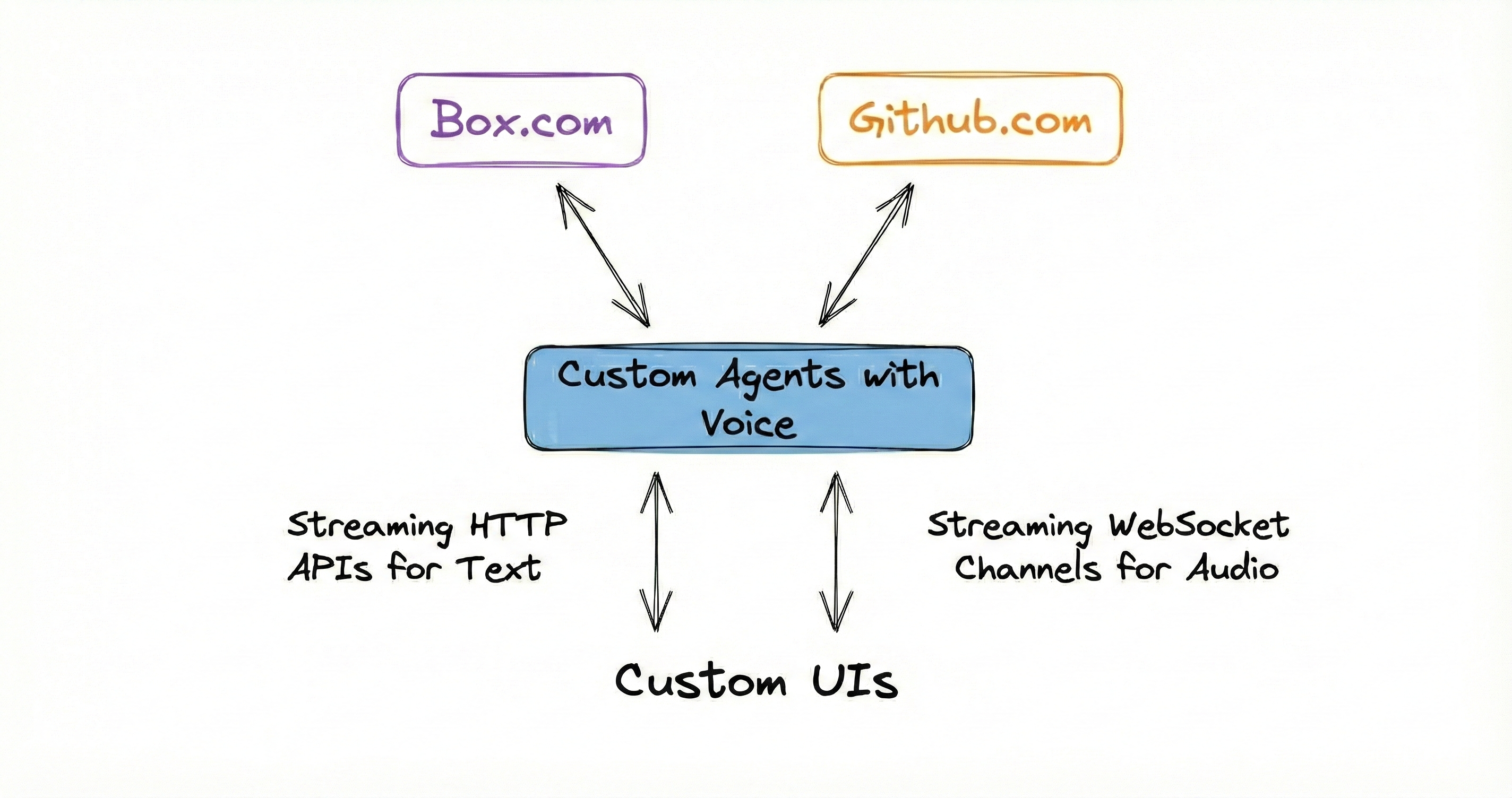
Voice agent interface for Box and GitHub
The complete source code is available at github.com/build-trust/autonomy-and-box.

Prerequisites

Before starting, ensure you have:
  1. Sign up and install the autonomy command.
  2. A Box developer account with API credentials.
  3. A GitHub personal access token.
  4. Docker running on your machine.

Project Structure

File Structure:
autonomy-and-box/
|-- autonomy.yaml           # Deployment configuration
|-- secrets.yaml            # Your API credentials (gitignored)
|-- secrets.yaml.example    # Template for credentials
|-- images/
|   |-- main/
|       |-- Dockerfile      # Container definition
|       |-- main.py         # Application entry point
|       |-- box.py          # Box API client
|       |-- github.py       # GitHub issue creation tool
|       |-- index.html      # Voice interface
|       |-- requirements.txt
|
|-- scripts/
    |-- upload_docs_to_box.py  # Utility to populate Box

Step 1: Clone the Repository

git clone https://github.com/build-trust/autonomy-and-box.git
cd autonomy-and-box

Step 2: Configure Box Credentials

Create a Box application in the Box Developer Console:
  1. Create a new Custom App.
  2. Select Server Authentication (Client Credentials Grant).
  3. Under Configuration, note your:
    • Client ID.
    • Client Secret.
    • Enterprise ID.
Copy the secrets template and add your credentials:
cp secrets.yaml.example secrets.yaml
Edit secrets.yaml:
secrets.yaml
BOX_CLIENT_ID: "your_box_client_id"
BOX_CLIENT_SECRET: "your_box_client_secret"
BOX_ENTERPRISE_ID: "your_box_enterprise_id"
GITHUB_TOKEN: "your_github_token"
GITHUB_REPO: "your-org/your-repo"
Never commit secrets.yaml to version control. It’s already in .gitignore.

Step 3: Configure GitHub Access

Create a GitHub Personal Access Token with repo scope to allow issue creation. Add the token and target repository to your secrets.yaml:
GITHUB_TOKEN: "ghp_xxxxxxxxxxxxxxxxxxxx"
GITHUB_REPO: "your-org/your-repo"

Step 4: Upload Documents to Box

The application searches documents stored in a Box folder. Use the included script to populate Box with sample documentation:
cd scripts
pip install box-sdk-gen httpx
python upload_docs_to_box.py
This script:
  1. Fetches documentation from autonomy.computer/docs/llms.txt.
  2. Parses all markdown file URLs.
  3. Creates a docs folder in Box.
  4. Uploads all documentation files.

Step 5: Understand the Application Code

The Main Application

The application creates a voice-enabled agent with access to a knowledge base and GitHub tools:
images/main/main.py
from autonomy import (
  Node,
  Agent,
  Model,
  Knowledge,
  KnowledgeTool,
  NaiveChunker,
  HttpServer,
  Tool,
)

async def main(node: Node):
  # Create knowledge base for document search
  knowledge = Knowledge(
    name="autonomy_docs",
    searchable=True,
    model=Model("embed-english-v3"),
    max_results=5,
    max_distance=0.4,
    chunker=NaiveChunker(max_characters=1024, overlap=128),
  )

  # Create tools
  knowledge_tool = KnowledgeTool(knowledge=knowledge, name="search_autonomy_docs")
  github_tool = Tool(create_github_issue)

  # Start the voice-enabled agent
  await Agent.start(
    node=node,
    name="autonomy-docs",
    instructions=INSTRUCTIONS,
    model=Model("claude-sonnet-4-v1", max_tokens=256),
    tools=[knowledge_tool, github_tool],
    voice={
      "voice": "alloy",
      "instructions": VOICE_INSTRUCTIONS,
      "vad_threshold": 0.7,
      "vad_silence_duration_ms": 700,
    },
  )

  # Load documents from Box
  await load_documents_from_box(knowledge)

Box Integration

The Box client handles authentication and document retrieval:
images/main/box.py
from box_sdk_gen import BoxClient, BoxCCGAuth, CCGConfig

class Box:
  def __init__(self):
    self.client = BoxClient(
      auth=BoxCCGAuth(
        config=CCGConfig(
          client_id=environ["BOX_CLIENT_ID"],
          client_secret=environ["BOX_CLIENT_SECRET"],
          enterprise_id=environ["BOX_ENTERPRISE_ID"],
        )
      )
    )

  async def extract_text_representation(self, file_id: str) -> str:
    """Download file content from Box."""
    return await self.box_call(box_file_download_content, self.client, file_id)

  async def list_folder_items(self, folder_id: str):
    """List items in a Box folder."""
    return await self.box_call(self.client.folders.get_folder_items, folder_id)

GitHub Issue Tool

The GitHub tool allows the agent to create issues based on user requests:
images/main/github.py
async def create_github_issue(title: str, body: str, labels: str = "") -> str:
  """
  Create a GitHub issue in the configured repository.

  Args:
    title: The title of the issue
    body: The detailed description of the issue
    labels: Comma-separated list of labels to apply (optional)

  Returns:
    A message indicating success or failure with the issue URL
  """
  url = f"https://api.github.com/repos/{GITHUB_REPO}/issues"

  async with httpx.AsyncClient() as client:
    response = await client.post(url, headers=headers, json=data)

    if response.status_code == 201:
      issue_data = response.json()
      return f"Successfully created issue #{issue_data['number']}: {issue_data['html_url']}"

Agent Instructions

The agent has two sets of instructions - one for the primary agent and one for the voice interface:
INSTRUCTIONS = """
You are an expert assistant that answers questions about Autonomy.

You have access to a knowledge base containing complete documentation.
Use the search_autonomy_docs tool to find accurate information before answering.

IMPORTANT: Keep your responses concise - ideally 2-4 sentences. This assistant
is primarily used through a voice interface, so brevity is essential.

You also have the ability to create GitHub issues when users want to:
- Report bugs or problems.
- Request new features.
- Ask for documentation improvements.
"""

VOICE_INSTRUCTIONS = """
You are a voice interface for an Autonomy documentation assistant.

# Personality
- Friendly and approachable, like a helpful colleague
- Concise and clear - respect the user's time
- Confident but not condescending

# Critical Rules
1. Before answering ANY question, say a filler phrase first.
   Pick one randomly: "Good question." / "Right, so." / "That's a good question."
2. THEN delegate to the primary agent for the actual answer.
3. NEVER answer questions from your own knowledge - always delegate.
"""

Step 6: Deploy the Application

Deploy to Autonomy Computer:
autonomy zone deploy
The deployment configuration in autonomy.yaml defines the infrastructure:
autonomy.yaml
name: boxdocs
pods:
  - name: main-pod
    public: true
    size: big
    containers:
      - name: main
        image: main
        env:
          - BOX_CLIENT_ID: secrets.BOX_CLIENT_ID
          - BOX_CLIENT_SECRET: secrets.BOX_CLIENT_SECRET
          - BOX_ENTERPRISE_ID: secrets.BOX_ENTERPRISE_ID
          - BOX_FOLDER_PATH: "docs"
          - GITHUB_TOKEN: secrets.GITHUB_TOKEN
          - GITHUB_REPO: secrets.GITHUB_REPO
The size: big setting allocates more resources for the embedding model and voice processing.

Step 7: Access the Voice Interface

Once deployed, open your zone URL in a browser:
https://${CLUSTER}-boxdocs.cluster.autonomy.computer
To find your cluster name:
autonomy cluster show
Click the voice button and start talking to your assistant!

Using the Application

Voice Commands

Try these voice interactions:
  • “What is Autonomy?” - Searches the knowledge base and responds.
  • “How do I create an agent?” - Retrieves relevant documentation.
  • “I found a bug, help me report it” - Creates a GitHub issue.
  • “Can you file a feature request for better logging?” - Creates a GitHub issue.

API Access

You can also interact via HTTP:
curl --request POST \
  --header "Content-Type: application/json" \
  --data '{"message":"What are tools in Autonomy?"}' \
  "https://${CLUSTER}-boxdocs.cluster.autonomy.computer/agents/autonomy-docs?stream=true"

Refresh Knowledge Base

The knowledge base automatically refreshes every hour. To manually refresh:
curl --request POST \
  "https://${CLUSTER}-boxdocs.cluster.autonomy.computer/refresh"

How It Works

Document Loading

When the application starts:
  1. Connects to Box using CCG authentication.
  2. Navigates to the configured folder path (docs).
  3. Recursively lists all files in the folder.
  4. Downloads each file’s text content.
  5. Chunks documents and generates embeddings.
  6. Stores embeddings in the knowledge base.

Voice Flow

When a user speaks:
  1. Browser captures audio via Web Audio API.
  2. Audio streams to the agent via WebSocket.
  3. Voice Activity Detection (VAD) detects speech boundaries.
  4. Speech is transcribed and sent to the voice agent.
  5. Voice agent delegates to the primary agent.
  6. Primary agent searches knowledge and/or creates issues.
  7. Response is synthesized to speech.
  8. Audio streams back to the browser.
When searching documents:
  1. Query is embedded using Cohere’s embed-english-v3.
  2. Vector similarity search finds relevant chunks.
  3. Top 5 results within distance threshold (0.4) are returned.
  4. Agent uses retrieved context to answer.

Configuration Options

Voice Settings

Customize voice behavior in main.py:
voice={
  "voice": "alloy",              # Voice model: alloy, echo, fable, onyx, nova, shimmer
  "instructions": VOICE_INSTRUCTIONS,
  "vad_threshold": 0.7,          # Speech detection sensitivity (0.0-1.0)
  "vad_silence_duration_ms": 700, # Silence before end of speech
}

Knowledge Settings

Tune document search:
knowledge = Knowledge(
  name="autonomy_docs",
  searchable=True,
  model=Model("embed-english-v3"),
  max_results=5,        # Number of results to return
  max_distance=0.4,     # Similarity threshold (lower = stricter)
  chunker=NaiveChunker(
    max_characters=1024, # Chunk size
    overlap=128          # Overlap between chunks
  ),
)

Environment Variables

VariableDescription
BOX_CLIENT_IDBox OAuth client ID
BOX_CLIENT_SECRETBox OAuth client secret
BOX_ENTERPRISE_IDBox enterprise ID
BOX_FOLDER_PATHPath to documents folder in Box
MAX_DOCUMENTSLimit documents loaded (0 = all)
GITHUB_TOKENGitHub personal access token
GITHUB_REPOTarget repository (owner/repo)

Build with a coding agent

See the guide on building Autonomy apps using coding agents.

Troubleshooting

Verify your credentials in secrets.yaml. Ensure your Box app uses Server Authentication (Client Credentials Grant) and has the necessary scopes enabled.
Check that BOX_FOLDER_PATH matches your Box folder name. View logs with autonomy zone inlet --to logs to see which folders are found.
Verify your GitHub token has repo scope and the repository format is owner/repo.
Ensure your browser has microphone permissions. Use Chrome or Edge for best WebSocket and Web Audio API support.

Learn More