

Use this file to discover all available pages before exploring further.
1Password and Autonomy collaborated on AI SRE agents that safely diagnose and autonomously fix problems in production infrastructure. This guide shows you how to deploy them to your infra.Agent swarms require execution environments with explicit identity and strict boundaries. Autonomy treats agent identity and isolation as first-class concerns. Each agent has a unique cryptographic identity, and every action is attributable by design. In this guide, we show how agents authenticate as themselves, request access dynamically, and receive credentials from 1Password that are scoped to intent, time-bound, and revocable.
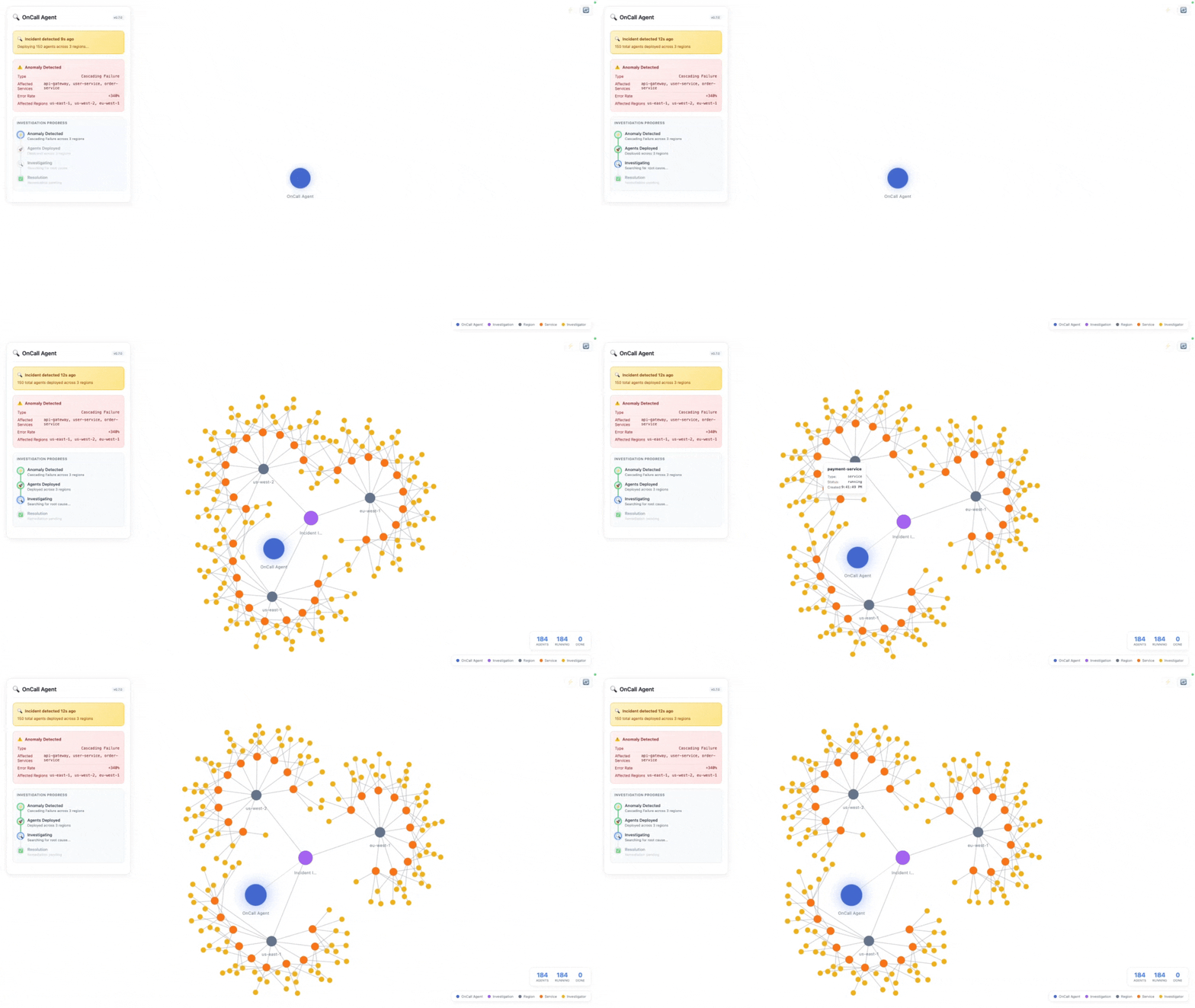
When you go on-call, the agent requests read-only credentials from 1Password to monitor your infrastructure. A human approves access, and the agent starts watching for anomalies.When an incident occurs, a swarm of 150+ agents spins up: some inspect logs, others correlate metrics, others evaluate fixes. Each agent has its own cryptographic identity and uses the pre-approved read credentials to investigate.
After the swarm identifies the root cause, it requests write credentials for specific remediation actions:kill runaway queries, disable a feature flag. Each write action requires separate human approval. Once approved, the swarm autonomously remediates the problem.Here’s what that looks like in code. The investigation spawns a swarm of specialist agents across every region and service, then synthesizes their findings:
/dev/null/conceptual.py
from autonomy import Agent, Model, Tool# ...# 3 regions × 10 services × 5 specialists = 150 diagnostic agentsregions = ["us-east-1", "us-west-2", "eu-west-1", ...]services = ["api-gateway", "user-service", "order-service", ...]specialists = ["database", "cache", "network", "resources", "logs"]# Each specialist type has its own diagnostic toolsdef tools_for(specialist): # database → query connections, find slow queries # cache → check hit rates, memory pressure # network → check latency, packet loss # resources → check CPU, memory, disk # logs → search for errors, trace requests return [...]# Define an agent and start investigationasync def investigator_agent(specialist, service, region, incident): agent = await Agent.start( node, instructions=f"You're a {specialist} diagnostic agent for {service} in {region}...", model=Model("claude-sonnet-4-5"), tools=tools_for(specialist), ) return await agent.send(f"Investigate {incident}")# 150 specialized agents, operating in a parallel scatter/gather patternfindings = await asyncio.gather(*[ investigator_agent(specialist, service, region, incident) for region in regions for service in services for specialist in specialists])
The application demonstrates a complete incident response workflow with secure credential handling.Monitor. A long-running Monitor starts when the app deploys and continuously watches for anomalies. In production, it would poll Prometheus, CloudWatch, or other metrics sources. For demos, anomalies are triggered via the /incidents endpoint.
images/main/main.py
class Monitor: """Watches for anomalies and spawns diagnostic investigations.""" async def start(self, node: Node): self.node = node self.running = True self._monitor_task = asyncio.create_task(self._monitor_loop()) async def _monitor_loop(self): """Background loop that checks metrics. In production, polls Prometheus/CloudWatch.""" while self.running: # In production: check metrics here and call trigger_anomaly() when thresholds exceeded await asyncio.sleep(30)
Two-phase credential approval. The system uses a two-phase approach to balance investigation speed with security:Phase 1: READ credentials : When you go on-call, the agent requests read-only credentials to monitor infrastructure. These are approved once at activation and shared across all diagnostic agents when an incident occurs.
images/main/main.py
# READ credentials needed for monitoring (requested at activation)MONITORING_READ_CREDENTIALS = [ "op://Infrastructure/prod-db-readonly/password", "op://Infrastructure/prod-db-readonly/username", "op://Infrastructure/prod-db-readonly/server", "op://Infrastructure/aws-cloudwatch/credential", "op://Infrastructure/k8s-prod-readonly/credential",]
Phase 2: WRITE credentials : After diagnosis, if the swarm identifies remediation actions (kill queries, disable feature flags), it requests write credentials for each specific action. These require individual human approval.
images/main/main.py
# WRITE credentials - require separate approval per actionCREDENTIAL_CATEGORIES: Dict[str, CredentialCategory] = { # READ credentials - approved once, shared across investigation "op://Infrastructure/prod-db-readonly/password": CredentialCategory.READ, # ... # WRITE credentials - require separate approval per action "op://Infrastructure/prod-db-rwaccess/username": CredentialCategory.WRITE, "op://Infrastructure/prod-db-rwaccess/password": CredentialCategory.WRITE, "op://Infrastructure/config-service/credential": CredentialCategory.WRITE,}
Parallel diagnostic swarm. Agents are actors in the Autonomy runtime:they don’t block, allowing massive parallelism on a single machine. The investigation spawns specialized agents across regions and services:
Each specialist agent has specific diagnostic tools:
Agent
Focus
Tools
database
Connection pools, slow queries
query_db_connections, query_slow_queries
cache
Hit rates, memory pressure
check_cache_health, get_eviction_stats
network
Latency, packet loss
check_network_latency, trace_route
resources
CPU, memory, disk
get_cloudwatch_metrics, check_instance_health
logs
Errors, traces
get_application_logs, search_errors
Synthesis and remediation. After all diagnostic agents complete, a synthesis agent combines findings and identifies the root cause:
images/main/main.py
async def run_swarm_diagnosis(node, problem, session_id, root_id, credentials): """Run parallel diagnosis across all regions and services. Spawns 150+ diagnostic agents (3 regions × 10 services × 5 agent types) all running in parallel. Agents are actors, so they don't block. """ targets = [] for region in REGIONS: for service in SERVICES: targets.append({"service": service, "region": region, ...}) # Run ALL targets in parallel - agents are actors, they don't block results = await asyncio.gather(*[run_target(t) for t in targets]) return results
Each diagnostic agent runs with specialized instructions and tools:
images/main/main.py
async def run_single_agent(self, agent_type, instructions, service_name, region, model): """Run a single diagnostic agent.""" agent = await Agent.start( node=self.node, instructions=f"""You are a {agent_type} diagnostic agent for {service_name} in {region}. {instructions} Provide a brief assessment of the {agent_type} health for this service.""", model=model, ) message = f"Diagnose {agent_type} health for {service_name} in {region}." responses = await agent.send(message) return { "agent_type": agent_type, "status": "completed", "finding": responses[-1].content.text }
After all diagnostic agents complete, a synthesis agent combines findings:
images/main/main.py
synthesis_agent = await Agent.start( node=self.node, instructions="""You are a senior SRE synthesizing diagnostic findings. Identify common patterns, determine root cause, and prioritize remediation. List any actions requiring WRITE access as "Actions Requiring Approval".""", model=Model("claude-sonnet-4-5"),)diagnosis = await synthesis_agent.send( f"Synthesize findings: {findings_summary}")
If the synthesis identifies remediation actions, the agent requests write credentials with individual human approval for each action.The dashboard includes a real-time D3.js force-directed graph that visualizes all agents as they spawn, investigate, and complete their work.POST /incidents : Trigger an incident investigation with 150+ diagnostic agents.Request:
POST /approve/ : Approve or deny credential access for an investigation.Request:
/dev/null/request.json
{ "approved": true}
Response (streaming): Events indicating credential retrieval, agent spawning, and diagnosis progress.Additional endpoints for visualization (/graph), history (/investigation/history), and health checks (/health) are available in the source code.
The example uses mock tools and manual triggers for demonstration. To adapt for your infrastructure:
Connect your monitoring : Replace the manual /incidents trigger with your observability stack. The Monitor._monitor_loop() can poll Prometheus, CloudWatch, or Datadog for anomalies.
Implement real diagnostics : Replace mock tool functions with actual infrastructure queries. For example, query_db_connections becomes a real PostgreSQL connection pool query, get_cloudwatch_metrics uses the AWS SDK.
Map your infrastructure : Update REGIONS and SERVICES to match your actual deployment topology. Add specialists for your stack (Redis, Kafka, etc.).
Configure 1Password : Set up vaults with your infrastructure credentials. The read/write separation ensures diagnostic queries use read-only access while remediation requires explicit approval.